

 Plus, TBS, ION, TBN, Univision, about 95 in all Plus, TBS, ION, TBN, Univision, about 95 in all

___________________________________________________________________________
THIS IS OUR SATELLITE TV SITE PLEASE GO TO OUR TV ANTENNA SITE BELOW

CLICK THE PHOTO BELOW TO GO TO OUR TV ANTENNA TV WEBSITE

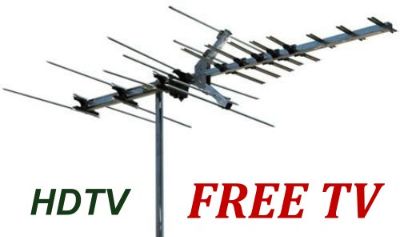 Digital TV Antenna Sales & Installation Please Visit Our Antenna Site For More Information On Antennas And The 75 + Channels You Could Receive Digital TV Antenna Sales & Installation Please Visit Our Antenna Site For More Information On Antennas And The 75 + Channels You Could Receive
<CLICK On The Picture
__________________________________________________________________________

The Digital TV switch was June 12, 2009, and millions of older televisions in American households went to snow unless they're analog TV's are outfitted to receive the new all-digital broadcasts. See "About Digital & HDTV" page and https://www.dtv2009.gov/

Have you purchased a new HD TV and want to receive the 70+- local digital & HD TV channels? Considering dropping cable and saving that monthly bill? Nowadays many people are switching to antenna TV. To receive the Atlanta over-the-air TV channels you will need an off-air-antenna. SATPRO Atlanta sells and installs Digital TV reception antenna systems to allow you to receive the FREE Atlanta digital over-the-air channels. SATPRO Atlanta can provide you with an antenna system that matches your needs and location. With our years of antenna and satellite TV experience and our professional quality work, you will enjoy all the maximum benefits of your antenna system. We have installed 100's of local antennas for our customers.Antenna TV in conjunction with FREE internet TV is enough for many people.
You may not know, but local HD reception can be very tricky. No one can guarantee all channels will come in trouble- free, still most do. But before you try to purchase and install an antenna system yourself, only to discover it doesn't work well after hours or days of installation and working with it, or you end up with the picture freezing constantly on some channels, consider calling us. We've seen this happen too many times you will save in the long run. Sometimes your hardware purchases and antennas may not be returnable if assembled and if ordered off the internet! And often, customer purchased antennas types just aren't suitable for their area. Save yourself some time and trouble, and get the job done right. Sometimes it even takes us extra time to get your channels, every location is different and has it own characteristics, even moving the antenna only 6 feet to a new location can gain or lose up to 10db in signal. This can be the difference in receiving or not receiving a channel! Some times an amplifier will need to be added to the antenna to receive a trouble-free signal, and still sometimes the signal can be too strong and an attenuator has to be used. Call SATPRO Atlanta for a professional antenna reception package quote, via email, and save yourself a big headache! With our decades of TV antenna and satellite TV experience, and our professional quality work, you will enjoy the maximum benefits of your HDTV antenna.
SATPRO can build and install an HDTV reception antenna system customized for your location to allow you to receive the 30+ Atlanta digital channels and digital sub-channels, so you can start enjoying more great HD programming uncompressed.
If needed we use the newest Digital terrestrial television signal meter if needed and your custom site survey to match the right antenna system, mount, and amplifier if needed, for your location for great reception. With our many years of antenna and satellite TV experience, and our professional quality work, you will enjoy the maximum benefits of your HDTV system.
Please email us from our, "Contact Us" from our antenna website contact form at: www.atlantadigitaltv.com with your contact information for a return email with our antenna package pricing. PLEASE DON'T CALL FOR AN ANTENNA SYSTEM QUOTE. Each address has to be evaluated for reception which can be time consuming. Email for a Price Quote.
___________________________________________________________________________

For some viewers there is enough programming via over-the-air antenna and internet TV to satisfy their TV needs. Satellite has smaller satellite and lower cost packages for these viewers. Just a year ago satellite only offered a hand full of HD channels so many people couldn't justify up grading to satellite HD. Well that has changed now with both DirecTV and Dish Network offering over 130 HD channels depending on the package you subscribe to and many in 1080i and 1080p. Most all the digital flat panel TV's now have built in digital tuners that can receive Atlanta's digital over-the air channels and sub-channels with plenty of programming to view. Most all network sports is in HD now, and most all major network programming starting at network news time each evening is in HD. Or, by adding an HD stand alone tuner to their older HD Ready TV without a built-in HD tuner, you can start receiving and viewing all the local digital/ HD channels. If you already have an HD satellite receiver, it may have a built in over-the-air tuner, so all you need is an HD antenna hooked up to its antenna connection. All new TV's must have digital (HD) tuners built into them. Monitors are not required to have a tuner. The Atlanta digital sub-channels are offering more and more programming, especially with weekends sports. Only by OTA.
Nowadays digital converter boxes are available at most electronic stores, Target, Wal-Mart etc. that will convert an older analog (Glass tube set) TV for digital channel viewing {not HD}. So it is not necessary to purchase a new set. To receive HD you must have a newer HDTV set which will have a built in digital tuner. Click on About Digital and HDTV for more information.
Over-The-Air signals are uncompressed and preferred over satellite or cable HD signals, see below.
___________________________________________________________________________

I get great HDTV reception — better than from my HDTV cable box, better than from satellite. And unlike the other choices, it's free. The technology I use isn't secret or new. In fact, it's older than the most ancient TV set in your basement. Yet the picture is likely crisper than any you've seen before. It puts HDTV from cable and satellite in the shade. I'll tell you about it in a moment. Today we'll talk about several ways to get more enjoyment from your HDTV set. We'll start with my recipe for free, crisp pictures. I don't want to keep you in suspense unless it is absolutely necessary. The best possible HDTV pictures — no exceptions, no quibbles — come from those you get using an antenna. Here's why: When cable or satellite companies broadcast HDTV programming, they use compression techniques to get all that data into their comparatively narrow pipeline. Compressing the data is good for the folks who deliver the signal — it lets them cram more programming into the bandwidth available. It's bad for you. Hey, condensed milk tastes different from fresh milk, and condensed TV looks different from what you get if you didn't tamper with the signal. Broadcast TV doesn't compress the signal. I live in town, so I can get away with a simple indoor antenna I picked up at Radio Shack. If you want an even better setup, or if you live a long distance from a broadcaster, you may need an antenna in your attic or even on your roof. You won't have any trouble finding old-fashioned antennas — anything from rabbit ears to the big roof-mounted jobs. In fact, HDTV has created a resurgence for the antenna. Here's a quick way to find out the specifics of what you need to do from your own home: The Web site www.antennaweb.org will tell you which stations are broadcasting in your area and what kind of an antenna you'll need. In my own case, there's an added bonus besides the great picture — my cable company doesn't carry the HDTV feed for at least one station in my area. But the HDTV version is available using my home antenna.
BILL HUSTED
The Atlanta Journal-Constitution Published on: 03/12/06
___________________________________________________________________________

True HDTV programming is typically broadcast in one of three resolutions: 1080i, 1080p (newest) or 720p. Most broadcast networks have opted for the 1080i format, boasting that it provides the highest possible resolution, while ABC and ESPN HD went for the smoother pictures of 720p. Fox has announced that it will use 720p for it's HDTV broadcasts. What's the real difference between the two? While 1080i technically offers the most lines of resolution, it's delivered in the old style interlaced format, meaning that your TV set draws each frame in two passes: once for the even horizontal lines, and a second time for the odd lines. The 720p (progressive) format has fewer lines of information than 1080i but draws each frame in a single pass, delivering pictures that look slightly smoother than an interlaced image, especially when there's a lot of movement on the screen. Most videophiles agree that 720p is the superior format, despite 1080i's resolution advantage. For average viewers, however, it's hard to tell the difference. Progressive scan DVD player's play in 480p. EDTV 16:9 {or ED Enhanced Definition} is 480p. SDTV {or SD Standard Definition} is 480i 4:3. UPDATE 2009: 1080i & p is now becoming the standard.
___________________________________________________________________________



Television waves travel in straight lines rather like light rays and do not bend much around obstacles. Consequently, wherever you live, your receiving antenna should be outdoors as high as possible and in the clear, so that it gets the best direct signal. It is important to use a good quality antenna. The location of the antenna is important, with consideration for the frequency, power, and your distance from the transmitters for the channels you wish to receive. Most antennas consist of a main boom with several elements on it. The more elements, the higher the gain and the sharper the antenna directivity becomes. TV and FM transmissions in North America are required to have horizontal polarization.

In addition to the direct signal from the transmitting station, your antenna can receive signals reflected from the nearby ground or other surfaces. These signals can add or subtract from the direct signal, giving stronger or weaker signals at your antenna. Known technically as `standing wave patterns', they are different on each of the channels - because of their different wavelengths. So, although all the transmitted signals originate from the same location at the same power and on similar frequencies, some reception may be poor, while reception is excellent on others.

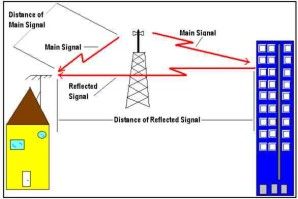
Multipath signals on a digital TV are caused by reflected signals, also called multipath signals, from hills, tall buildings, cranes, trees, etc, arriving at your antenna a tiny fraction of a second after the direct signal from the transmitter. These delayed signals appear as freezing or pixelation of the picture on the screen. Digital TV is particularly sensitive to corruption by multipath. A good directional antenna like SATPRO uses, is needed to reject the unwanted signals. If these reflected signals come from the general direction in which the antenna is pointing, a grid reflector or elements at the back of the antenna can be effective. If the multipath signals are from the sides and rear of the antenna, a grid type reflector is desirable.

Trees and their leaves can reduce television signal strengths, and can create complicated reception patterns around your antenna. Again, the wavelength of the signal determines where the resulting peaks and nulls are located. Reception can vary as the foliage moves in the wind and as the trees gain or lose their leaves in the spring and autumn. Even with evergreen trees, the rising sap in the spring can affect television reception. Reception may be different in the summer and in the winter. Trees both attenuate and reflect radio waves. Though trees in Atlanta can cause pixelation in some areas of town, this will only usually occur on very windy days when the miles of trees between your location and the transmitters are in motion from the wind, disturbing the digital signals.
___________________________________________________________________________
My Homeowners Association won't permit me to have an HDTV antenna! Are they in violation of any law? Yes: the 1969 FCC OTARD rule...
See: the FCC's 1996 ORTAD rule, under our "Installation & Service" tab.
___________________________________________________________________________
SEE OUR: "ABOUT DIGITAL & HDTV" PAGE, FOR MORE ON HDTV
___________________________________________________________________________
Types Of Antennas Used For HDTV Reception
 4 Bay Uhf HDTV Antenna. Good for inside I285 4 Bay Uhf HDTV Antenna. Good for inside I285
 8 Bay Uhf HDTV Antenna. Beyond I-285 8 Bay Uhf HDTV Antenna. Beyond I-285
 Vhf & Uhf HDTV Antenna. Some areas Vhf & Uhf HDTV Antenna. Some areas
* Your antenna type is dependent upon your specific location in relation to all TV towers. Some areas may be in a dead spot for reception of certain HD channels.
>>>>> Check out our "Photo Gallery" page for HDTV antenna photos. <<<<<
Helpful Links
All About HDTV & OTA: http://www.myfreehdtv.org
Antenna Web: http://www.antennaweb.org
HD + Programming: http://www.titantv.com
FCC's HDTV Site: http://www.dtv.gov/whatisdtv.html
|